Multi-Factor Authentication: Set up Text Messaging as Your Verification Method.
Open your browser and log in to mySMU and open the Webmail App, located in Communications under Catalog.
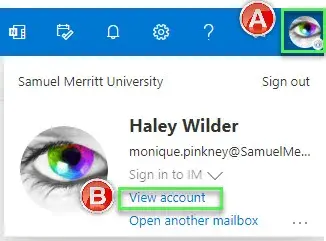
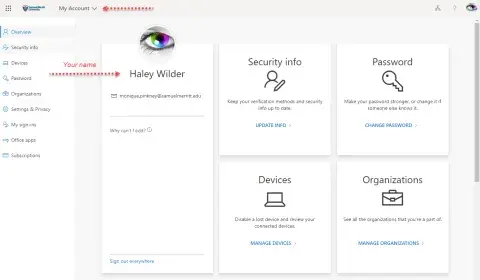
From within Outlook Web Access, go to Account Manager by clicking the Rightmost icon on the toolbar and then click view account.
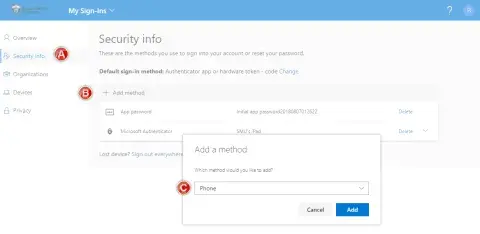
In the left navigation menu, select Security info, then Add method, and choose Phone.
On the Add a method page, select Add.
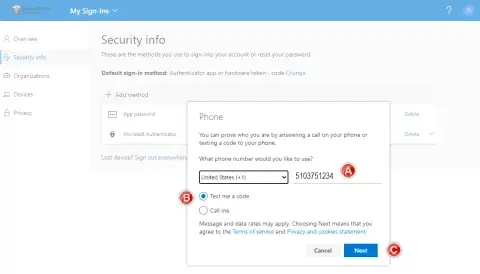
On the Phone page, enter the phone number for your mobile device, choose Text me a code, and then select Next.
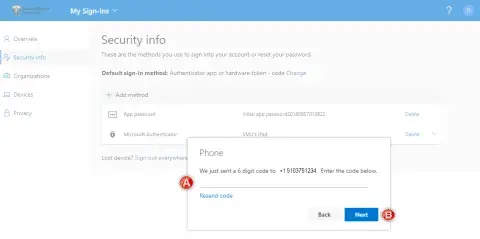
Enter the code sent to you through text message to your mobile device, and the select Next.
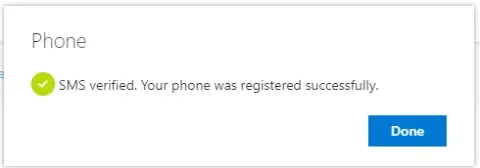
A confirmation indicating the phone number is registered appears.
OUR CAMPUSES
Prepare for a career that makes a difference. Explore programs, connect with admissions, and take the next step toward becoming a healthcare professional.
Oakland
525 12th St.
Oakland, CA 94607
800.607.6377
Sacramento
2710 N. Gateway Oaks Dr.
Suite 360
Sacramento, CA 95833